Desk depth: the working arc that decides where your monitors can go
Desk depth is not about having room for things. It is about how far your hands travel and where your eyes can focus without strain. Get the depth wrong and the correct viewing distance you calculated in chapter 3 becomes physically impossible.
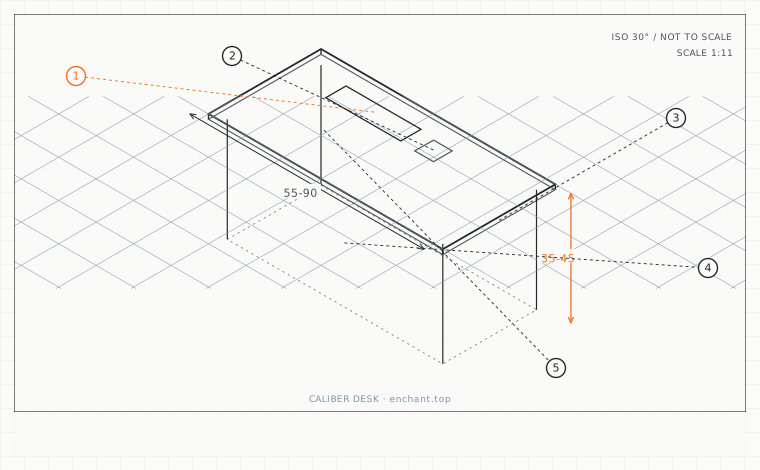
| Callout | Item | Ideal | Band | Why this band |
|---|---|---|---|---|
| 1 | Primary working zone depth | 35 | 30-40 cm | Everything you touch constantly stays inside a relaxed forearm reach. |
| 2 | Secondary zone depth | 40 | 35-45 cm | Room for a document holder or a second display without a full reach. |
| 3 | Total usable desk depth | 60-80 | 55-90 cm | Below 55 cm the monitor ends up closer than the correct viewing distance. |
| 4 | Depth reclaimed by a monitor arm | 8-12 | 6-16 cm | The footprint a base stand wastes can be recovered for working space. |
| 5 | Minimum chair-to-wall distance | 90 | 85-110 cm | Below this the chair cannot roll back and you lose effective depth. |
Split the desk into three depth zones
From your torso outward, the first 35 cm is the primary zone: keyboard, mouse, and anything you touch more than ten times an hour. The next 40 cm is the secondary zone for a document holder or a second screen. Everything beyond 75 cm is storage - if you have to stand to reach it, it does not belong on the desk.
Measure your desk depth as the usable distance from the front edge of the keyboard to the back edge of the work surface, not the catalogue dimension of the whole top. A 60 cm desk with a 12 cm cable channel at the back has 48 cm of usable depth.
Why dual screens eat depth
Two 27-inch monitors side by side need roughly 130 cm of width but only 60-70 cm of depth if they are flat. Put them on a single arm and they gain depth: the arm's base and the pivot geometry push the panel back, and the second screen's outer edge swings forward when you angle it inward.
The result is a working arc that reaches 75-85 cm from your eyes. If your desk is 60 cm deep and your chair cannot tuck far in, you end up sitting closer than your eyes want, and the fix is usually an arm with a longer reach rather than a deeper desk.
Depth for a small room
In a small room the depth constraint usually comes from the chair, not the desk. A 60 cm desk plus a wall behind you means the chair cannot roll back, which forces you forward and shrinks your effective depth by 10-15 cm. Measure the distance from the desk front edge to the wall before you buy anything.
If that distance is under 90 cm, choose a 60 cm desk rather than a 70 cm one and put the difference into a monitor arm. Arms reclaim 8-12 cm of depth that legs and stands waste.
Before you measure
- Measure usable depth from the keyboard front edge to the desk back edge
- Confirm the keyboard and mouse both sit inside the first 35 cm
- Check that nothing you use hourly sits beyond 75 cm
- Measure the gap from desk front edge to the wall behind the chair
- If under 90 cm, plan a monitor arm instead of a deeper desk
Once it is measured
- Primary zone 35 cm, secondary 40 cm, storage beyond 75 cm
- Usable depth excludes cable channels and monitor stand footprints
- Dual screens reach further than their catalogue depth suggests
- In a small room, a monitor arm buys more usable depth than a deeper desk
Three budget bands
Under $40 - a clamp-on single monitor arm. Reclaims 8-12 cm of depth and costs less than any desk upgrade.
$120-$250 - a dual arm with at least 45 cm of reach per side, so both panels can sit at the same viewing distance.
$600-$1200 - a desk 75-80 cm deep with an integrated cable tray and a rear rail, giving full dual-screen depth without a wall of arms.
Printable spec
Primary zone 35 cm - secondary 40 cm - usable depth 60-80 cm - monitor arm reclaims 8-12 cm - keep 90 cm to the wall behind the chair
Questions that come up
- Is a 60 cm desk enough for two monitors?
- For width, yes if you stack or use one arm with the panels overlapping in depth. For depth, 60 cm is enough only if the chair can tuck fully in - measure the chair-to-wall gap first, because that is what usually decides it.
- Does a deeper desk make me sit further from the screen?
- No. Depth gives you room to place the screen correctly; it does not push you back. The screen position is set by viewing distance, and the desk just has to be deep enough not to force it closer.
Adjacent factors
- 2.05Desk height: seat height plus 20 to 25 cm, and why 75 cm fits almost nobody
- 2.05Keyboard height and tilt: the negative-angle trick that saves your wrists
- 2.05Mouse plane and arc: matching the mouse height to the keyboard
- 2.05Under-desk clearance: the measurements that decide whether you can sit close
- 2.05Laptop riser math: how high the stand has to be, calculated not guessed
This page is measurement reference material, not medical advice. It describes dimensions that reduce load on a healthy adult at a desk; it does not diagnose, treat or prevent any condition. If you have an existing back, neck, wrist or circulation problem, or you are pregnant, take the numbers to a clinician or a qualified ergonomist rather than treating them as a prescription. All figures are adult anthropometric approximations - measure your own body before you spend money.