Laptop riser math: how high the stand has to be, calculated not guessed
Raising a laptop to eye level is the standard advice, and it is also incomplete. The stand has to reach a specific height, and that height is arithmetic you can do in thirty seconds with a tape measure. Guess it and you will buy a stand that is 6 cm short.
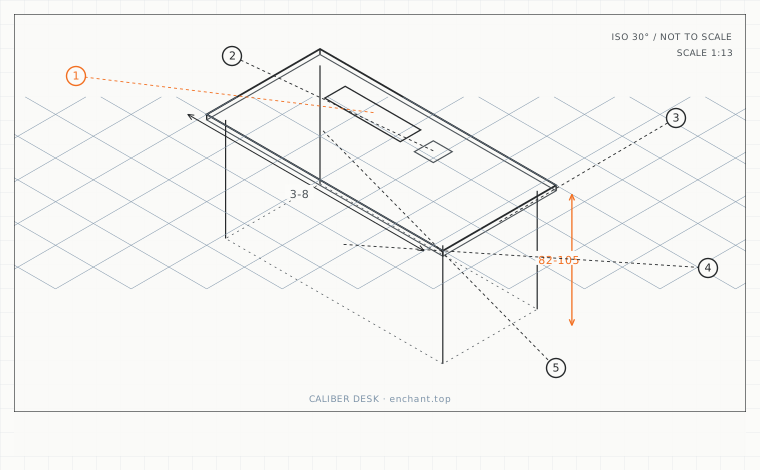
| Callout | Item | Ideal | Band | Why this band |
|---|---|---|---|---|
| 1 | Seated eye level (floor to eyes, looking level) | 105-130 | 100-135 cm | The reference point for every screen-height decision. |
| 2 | Laptop screen top height when open and flat | 88-98 | 82-105 cm | Depends on surface height, which is why a stand's lift figure alone is useless. |
| 3 | Downward gaze offset added to the calculation | 5 | 3-8 cm | Puts the screen top slightly below level rather than exactly at eye height. |
| 4 | Typical required riser lift | 25-35 | 18-45 cm | The number most single-piece stands cannot reach. |
| 5 | Minimum contact area for a stacked stand | 60 | 50-100 % | Below this the stack tips when you press the screen. |
The calculation
Sit correctly. Measure from the floor to your seated eye level, looking straight ahead at a distant point, not down at the screen. Then measure the height of your laptop's screen top above the floor when it is open and sitting flat on the surface you intend to use.
Riser height = seated eye level minus laptop screen top height, plus 5 cm for a slight downward gaze. Example: eye level 118 cm, screen top 92 cm, so the riser needs to lift the laptop by 118 - 92 + 5 = 31 cm. Most marketed stands lift 12-18 cm, which is why a single stand rarely solves it.
Stacking to reach the number
If no single stand reaches your figure, stack: a 15 cm stand plus a 10 cm riser block gets 25 cm, and a stack is stable if the contact area is at least 60 percent of the laptop's base. Check the fan intake is not blocked - most laptops draw air from the underside, and a solid stack over the vents raises internal temperatures by 8-12 degrees.
A better alternative for tall numbers is an articulated arm that clamps to the desk and holds the laptop platform from underneath. Arms commonly reach 40 cm above the desk surface, which covers the full range.
The keyboard you will need
Once the laptop is at eye level, its keyboard is unusable - reaching it puts your hands 25-30 cm above elbow height. You need an external keyboard and, in most cases, an external mouse. Budget for both at the same time as the stand, or the setup will be abandoned within a week.
If you travel, look for a folding stand under 400 g and a keyboard that is under 30 cm wide. Both fit in the laptop sleeve, and a 400 g stand plus a 300 g keyboard is a real cost in a carry-on - weigh it before you commit.
Before you measure
- Measure seated eye level looking straight ahead, not at the screen
- Measure laptop screen top height on the surface you will actually use
- Calculate riser height = eye level - screen top + 5 cm
- Check the stand does not block the laptop's underside vents
- Add an external keyboard and mouse to the setup on the same day
Once it is measured
- Riser height = seated eye level minus laptop screen top, plus 5 cm
- Typical answer is 25-35 cm, far more than most stands offer
- Stacked stands must not block the underside vents
- Budget for an external keyboard and mouse at the same time
Three budget bands
Under $30 - a fixed aluminium stand lifting 12-15 cm plus a stackable riser block to reach the calculated figure.
$60-$140 - an adjustable stand with a 10-40 cm range and a vent gap under the platform.
$200-$400 - a desk-clamp laptop arm reaching 40 cm above the surface with a separate keyboard tray on the same post.
Printable spec
Riser = seated eye level - laptop screen top + 5 cm - typical 25-35 cm - keep vents clear - external keyboard and mouse required
Questions that come up
- Can I use a stack of books instead of buying a stand?
- Yes, and it is the fastest way to find your correct height before spending anything. Tape the books together, leave a 2 cm gap under the laptop for airflow, and note the total height - that is the specification you then buy to.
- My laptop screen is small. Does that change the riser height?
- It changes the viewing distance more than the height. A 13-inch panel at a 60 cm viewing distance has the same angular size as a 24-inch panel at 110 cm, so a small screen wants to be closer, which a riser alone will not achieve.
Adjacent factors
- 2.05Desk height: seat height plus 20 to 25 cm, and why 75 cm fits almost nobody
- 2.05Keyboard height and tilt: the negative-angle trick that saves your wrists
- 2.05Desk depth: the working arc that decides where your monitors can go
- 2.05Mouse plane and arc: matching the mouse height to the keyboard
- 2.05Under-desk clearance: the measurements that decide whether you can sit close
This page is measurement reference material, not medical advice. It describes dimensions that reduce load on a healthy adult at a desk; it does not diagnose, treat or prevent any condition. If you have an existing back, neck, wrist or circulation problem, or you are pregnant, take the numbers to a clinician or a qualified ergonomist rather than treating them as a prescription. All figures are adult anthropometric approximations - measure your own body before you spend money.