Keyboard height and tilt: the negative-angle trick that saves your wrists
Keyboards are built with the back edge higher than the front, which is exactly backwards for typing. Reversing that slope - tilting the keyboard so the back edge is lower - removes the wrist extension that causes most typing discomfort.
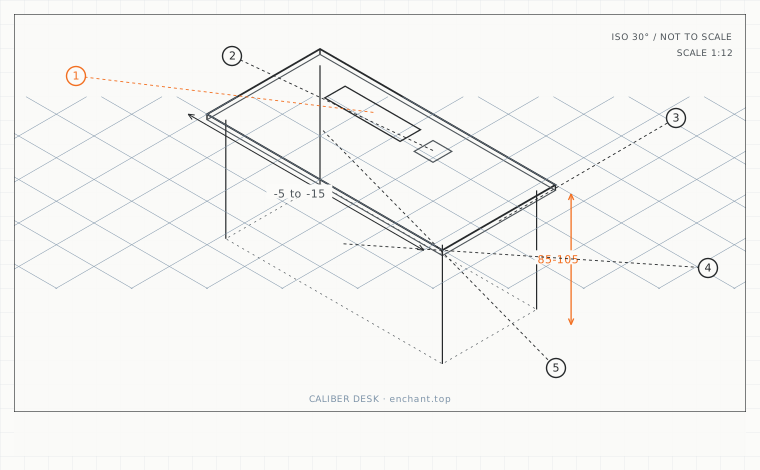
| Callout | Item | Ideal | Band | Why this band |
|---|---|---|---|---|
| 1 | Keyboard height above the seat | 20-25 | 18-28 cm | Same as desk height, because the keyboard sits on the desk. |
| 2 | Elbow angle while typing | 90-100 | 85-105 deg | Above 105 degrees the forearm bears weight; below 85 the shoulder lifts. |
| 3 | Keyboard negative tilt | -10 | -5 to -15 deg | Brings the wrist toward neutral without needing a pad. |
| 4 | Front shim thickness for negative tilt | 1-2 | 0.5-3 cm | A cheap reversible way to reverse a keyboard's built-in slope. |
| 5 | Wrist rest height relative to keyboard front edge | 0 | -1 to +0.5 cm | Level or slightly lower; anything higher reintroduces extension. |
Height first, then tilt
Set the keyboard so that, with your shoulders relaxed, your upper arm hangs vertically and your elbow is at 90-100 degrees. Your forearm should slope very slightly down toward the keys, not up. Measure from the floor to the top of the spacebar row - a typical result is seat height plus 20-25 cm, the same number as your desk height.
On a standing desk, the keyboard height only matters in the standing position: raise the desk until the elbow angle is right while standing, then note the number and store it as your standing preset. Do not carry the sitting number over.
The negative tilt
Almost every keyboard has flip-out feet at the back. Fold them away, and if the keyboard still slopes backward, put a 1-2 cm shim under the front edge. Aim for the back edge 5-15 degrees lower than the front. This brings the wrist toward neutral and lets the fingers reach the top row without lifting the whole hand.
The exception is a lap or sofa setup where the keyboard sits below elbow height. There, a slight positive tilt is correct, because the forearm is already sloping downward and a flat keyboard would force the wrist into flexion instead.
The wrist rest question
A wrist rest is a hand-positioning device for the pauses between bursts of typing, not a place to rest your wrists while typing. Used as a typing support it compresses the carpal tunnel continuously. Used as a pause pad - palms on it, wrists floating - it helps you return to the same neutral position each time.
Height matters: the pad should be level with the front edge of the keyboard, not above it. A pad that is 1 cm too high reintroduces exactly the extension the negative tilt removed.
Before you measure
- Relax the shoulders and check the elbow sits at 90-100 degrees
- Fold away the keyboard feet and check the slope
- If the back edge is still high, shim the front by 1-2 cm
- Set the wrist rest level with the keyboard front edge
- On a sit-stand desk, set and store a separate standing preset
Once it is measured
- Keyboard height = seat height + 20-25 cm, so the elbow sits at 90-100 degrees
- Aim for a negative tilt: back edge 5-15 degrees lower than the front
- On a standing desk, set the standing height separately and store it as a preset
- A wrist rest is for pauses; it should be level with the keyboard front edge
Three budget bands
Under $25 - a self-adhesive rubber strip under the keyboard's front edge plus a folded card. Ten minutes to a 10-degree negative tilt.
$120-$300 - a split or tented keyboard with adjustable negative tilt built into its legs, so no shimming is needed.
$400+ - a keyboard tray with a dedicated negative-tilt bracket, a palm pad at the correct level, and a mouse platform at the same height.
Printable spec
Keyboard at seat + 20-25 cm - elbow 90-100 deg - negative tilt -10 deg (5-15) - 1-2 cm front shim - wrist rest level with the front edge
Questions that come up
- My keyboard's feet are the only height adjustment. What then?
- Fold them away and shim the front instead. The feet exist because keyboards used to be compared on tilt, not because tilt upward is useful. Removing them costs nothing and fixes the direction of the slope.
- Does a negative tilt work on a laptop?
- No - a laptop keyboard cannot be tilted independently of the screen, which is one of several reasons to use an external keyboard whenever the laptop is raised on a stand.
Adjacent factors
- 2.05Desk height: seat height plus 20 to 25 cm, and why 75 cm fits almost nobody
- 2.05Desk depth: the working arc that decides where your monitors can go
- 2.05Mouse plane and arc: matching the mouse height to the keyboard
- 2.05Under-desk clearance: the measurements that decide whether you can sit close
- 2.05Laptop riser math: how high the stand has to be, calculated not guessed
This page is measurement reference material, not medical advice. It describes dimensions that reduce load on a healthy adult at a desk; it does not diagnose, treat or prevent any condition. If you have an existing back, neck, wrist or circulation problem, or you are pregnant, take the numbers to a clinician or a qualified ergonomist rather than treating them as a prescription. All figures are adult anthropometric approximations - measure your own body before you spend money.