Seat depth: the measurement that decides whether your back gets support at all
Seat depth is the one chair number almost nobody checks, and it silently cancels out every other adjustment. If the pan is too deep your back never touches the backrest; too shallow and your thighs carry your torso weight. Both end in the same place - a backrest that does nothing.
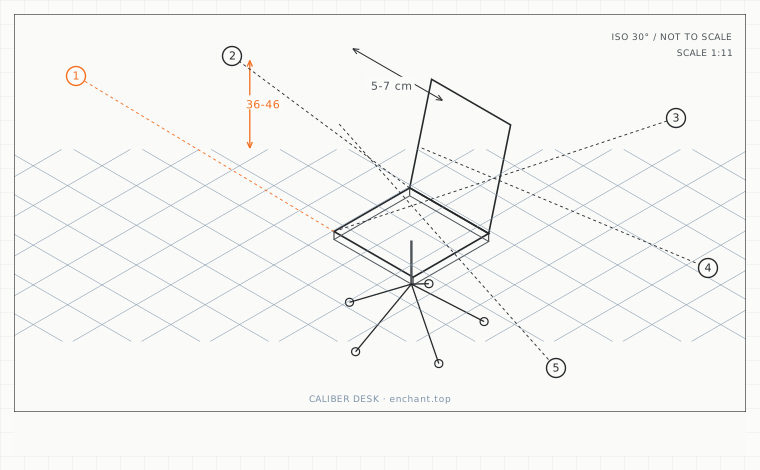
| Callout | Item | Ideal | Band | Why this band |
|---|---|---|---|---|
| 1 | Usable seat depth (backrest face to front edge) | 38-43 | 36-46 cm | The working range for most adults; outside it the backrest stops doing work. |
| 2 | Gap between knee crease and seat front | 5-7 | 4-10 cm | Enough thigh support without pressure behind the knee. |
| 3 | Catalogue vs. usable depth difference | 3-6 | 2-8 cm | Explains why a chair that 'fits' online arrives 5 cm too deep. |
| 4 | Seat-pan slide travel needed | 5 | 4-8 cm | Covers the difference between a 165 cm and a 190 cm user in the same chair. |
| 5 | Reducer wedge thickness | 4-6 | 3-8 cm | Takes up the excess without pushing the pelvis into a posterior tilt. |
Measure from the backrest, not the front edge
Sit as far back as the chair allows with your shoulder blades on the backrest. Measure from the front face of the backrest to the front edge of the seat pan. That is your usable seat depth, and it is usually 3-6 cm less than the catalogue figure, which measures the whole pan.
Compare it to your buttock-to-knee-crease length: measure from the rearmost point of your buttocks to the popliteal crease while standing against a wall. Usable seat depth should be 5-7 cm shorter than that number, never longer.
Dual-screen setups drift forward
Two monitors push the primary viewing target wider and further away, and the natural response is to slide forward until your back leaves the backrest. Within an hour you are perched on the front third of the pan with an unsupported lumbar curve.
The correct order of adjustment for a dual-screen desk is: seat depth first so the backrest is in contact, then viewing distance, then monitor height. Adjusting the screens first guarantees you will keep sliding forward.
When the pan is simply too deep
If usable seat depth exceeds your buttock-to-knee measurement, a lumbar cushion is the wrong fix - it pushes you further forward. Use a seat-pan reducer: a firm wedge or a rolled towel placed at the backrest to take up 4-6 cm, or choose a chair with a sliding seat pan and lock it forward.
Check the sliding pan before you trust it. Many move 5 cm but lock only at the extremes, so the useful mid position does not exist. Sit in the chair, set the pan, then push back hard with both feet - it should not creep.
Before you measure
- Sit fully back with shoulder blades touching the backrest
- Measure backrest face to seat front edge = usable seat depth
- Stand against a wall and measure buttocks to knee crease
- Confirm usable depth is 5-7 cm shorter than that length
- Push back hard with both feet - the pan must not creep
Once it is measured
- Usable seat depth is measured from the backrest face, not the pan's front edge
- It should be 5-7 cm shorter than your buttock-to-knee-crease length
- Two monitors cause forward drift, so set seat depth before viewing distance
- A pan that is too deep needs a reducer behind you, not a lumbar cushion
Three budget bands
Under $30 - a firm wedge cushion or a dense rolled towel plus two straps. Returns 4-6 cm of usable depth to any chair.
$200-$450 - a chair with a sliding seat pan that locks in at least three positions, not just the two extremes.
$700+ - a chair with independent seat-depth and backrest-angle adjustment, so depth can be tuned after recline is set.
Printable spec
Usable seat depth 38-43 cm from the backrest face - 5-7 cm behind the knee crease - never deeper than buttock-to-knee length
Questions that come up
- Can I just sit forward and ignore seat depth?
- That is what most dual-screen users end up doing by accident, and it removes lumbar support entirely. If you genuinely prefer sitting forward, choose a forward-tilt seat pan at minus 5 degrees and let the backrest stay in contact at the sacrum.
- Does a mesh seat change the measurement?
- Yes, by 1-2 cm. Mesh sags under load, so a 42 cm mesh pan can measure 44 cm across the frame but give you 42-43 cm of actual support. Measure seated, not with the chair empty.
Adjacent factors
- 1.05Seat height: the measurement everything else is built on
- 1.05Seat pan tilt: the 5 degrees that decides whether you fidget or ache
- 1.05Lumbar support height: find it by measuring your belt line, not your waist
- 1.05Armrest height: how high before they start lifting your shoulders
- 1.05Backrest angle and tension: the two settings people never touch
This page is measurement reference material, not medical advice. It describes dimensions that reduce load on a healthy adult at a desk; it does not diagnose, treat or prevent any condition. If you have an existing back, neck, wrist or circulation problem, or you are pregnant, take the numbers to a clinician or a qualified ergonomist rather than treating them as a prescription. All figures are adult anthropometric approximations - measure your own body before you spend money.