Backrest angle and tension: the two settings people never touch
Recline angle and recline tension are separate adjustments, and on most chairs they are confused with each other. Angle is how far back the chair goes. Tension is how hard you have to push. Set them independently and the chair starts holding you up instead of you holding yourself up.
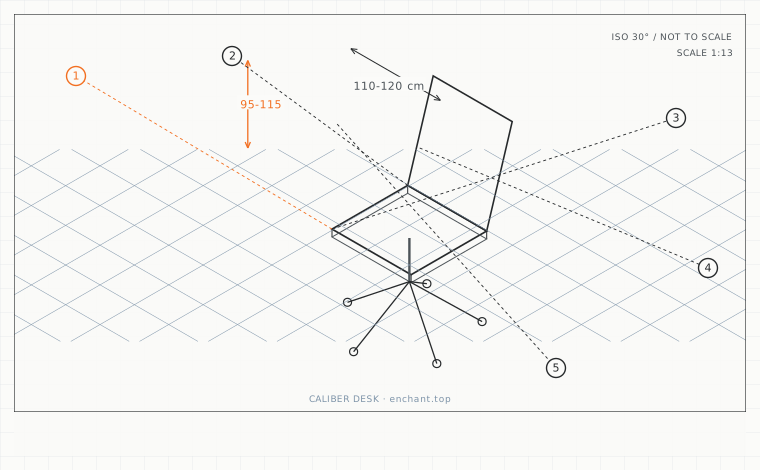
| Callout | Item | Ideal | Band | Why this band |
|---|---|---|---|---|
| 1 | Backrest angle for screen work | 100-110 | 95-115 deg | The backrest carries upper-body weight while the arms can still reach the keyboard. |
| 2 | Angle for calls and reading | 110-120 | 105-125 deg | More weight off the spine, still short of the range where the neck must crane. |
| 3 | Angle beyond which keyboard reach breaks | 120 | 120-130 deg | Past this the shoulders must roll forward to reach the keys. |
| 4 | Recline travel from upright | 20-35 | 15-45 deg | Enough range to change posture through a working day. |
| 5 | Time before you must change angle | 30 | 20-45 min | Even a good angle becomes a static load if you hold it all day. |
Angle: aim for 100 to 110 degrees for screen work
Measure the angle between the seat surface and the backrest. A right angle (90 degrees) is the setting most chairs ship with, and it is too upright for sustained work - it forces the spinal erectors to hold the torso against gravity with no help from the chair.
At 100-110 degrees the backrest carries a meaningful share of your upper-body weight. Past 120 degrees you lose the ability to reach the keyboard comfortably without pulling your shoulders forward, which is why a 135-degree recliner and a laptop are a bad pair.
Tension: set it so you can move it with your torso alone
Recline tension has no unit on the dial, so use a functional test. Sit with your feet off the floor and your hands in your lap. Lean back slowly. On a correctly set chair the backrest moves with you and stays where you leave it, or returns slowly. If you have to push with your feet or your arms, the tension is too high.
For a mobile or hotel setup where you are working in short blocks at different tables, set the tension lower than you would at a fixed desk. You want the chair to follow you rather than for you to negotiate with it each time you sit down.
Free-float versus locked
A free-floating recline keeps the backrest moving with your torso and is the better default for varied work: it lets your posture change continuously without you thinking about it. Lock the recline only for precision tasks such as drawing or for the last hour of a long session when you want to stop collapsing into the chair.
If your chair locks at four positions and none of them is between 100 and 110 degrees, use free-float and set the tension instead. That combination covers the same range continuously.
Before you measure
- Measure the seat-to-backrest angle with a protractor app
- Set 100-110 degrees for typing, 110-120 for calls and reading
- Test tension with feet off the floor and hands in your lap
- Leave the recline unlocked for varied work
- Change angle at least once every 30 minutes
Once it is measured
- Set the backrest to 100-110 degrees for sustained screen work
- Tension is a separate adjustment - test it with hands in your lap
- Free-float suits varied work; lock it for precision tasks
- If your four lock positions all miss 100-110 degrees, stay unlocked
Three budget bands
Under $30 - a wedge cushion to add 8-12 degrees of effective recline to a fixed-upright chair.
$250-$550 - a chair with a tension dial that has enough range to be slack at the lightest setting, plus at least four lock positions.
$800+ - a synchronised mechanism where backrest angle and seat pan tilt move on a fixed ratio, so recline automatically opens the hip.
Printable spec
Typing 100-110 deg - calls 110-120 deg - keyboard reach breaks past 120 deg - tension tested with hands in lap - change angle every 30 min
Questions that come up
- Why does my chair feel fine for an hour and painful after three?
- Almost always a locked recline at a single angle. Static load, not bad geometry, is what produces most office discomfort. Unlock the recline and change angle at least twice an hour before you consider replacing anything.
- Does a headrest change the recline setting?
- It should not, if you set it correctly. A headrest that forces your head forward at 100 degrees is set too far forward. At working angles the headrest should not touch you at all - it is for the 120-degree break position.
Adjacent factors
- 1.05Seat height: the measurement everything else is built on
- 1.05Seat pan tilt: the 5 degrees that decides whether you fidget or ache
- 1.05Seat depth: the measurement that decides whether your back gets support at all
- 1.05Lumbar support height: find it by measuring your belt line, not your waist
- 1.05Armrest height: how high before they start lifting your shoulders
This page is measurement reference material, not medical advice. It describes dimensions that reduce load on a healthy adult at a desk; it does not diagnose, treat or prevent any condition. If you have an existing back, neck, wrist or circulation problem, or you are pregnant, take the numbers to a clinician or a qualified ergonomist rather than treating them as a prescription. All figures are adult anthropometric approximations - measure your own body before you spend money.