Armrest height: how high before they start lifting your shoulders
Armrests are the feature most often set too high, because raising them feels like support. Above a certain point they lift the shoulder girdle and hold it there, and you end the day with trapezius tightness that no stretch will clear.
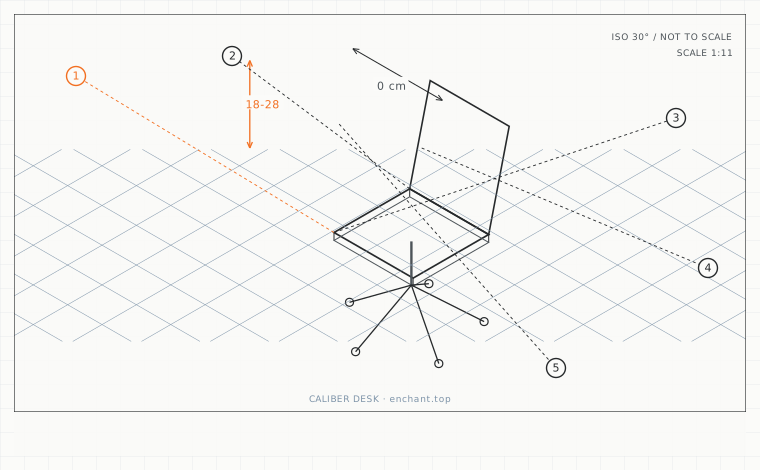
| Callout | Item | Ideal | Band | Why this band |
|---|---|---|---|---|
| 1 | Armrest height above seat surface | 20-25 | 18-28 cm | Measured with arms hanging; anything higher starts lifting the shoulder girdle. |
| 2 | Shoulder lift caused by a too-high armrest | 0 | 0-1 cm | A 2 cm lift held for hours is enough to produce trapezius tightness. |
| 3 | Clearance under the desktop | 1-3 | 1-6 cm | Enough to tuck in without being forced to sit further back. |
| 4 | Armrest centre-to-centre span | 40-48 | 36-52 cm | Keeps the outer edge under the shoulder joint and avoids internal rotation. |
| 5 | Minimum armrest padding | 2 | 2-4 cm | Spreads load away from the ulnar nerve at the elbow. |
Set them to your resting elbow, not your typing elbow
Sit with your shoulders fully relaxed and your arms hanging. Measure from the seat surface to the underside of your forearm at the elbow. That is your armrest height, and for most adults it is 20-25 cm above the seat.
The common error is measuring with your hands on the keyboard. Typing raises the forearm 2-4 cm depending on keyboard height, and setting the armrest to that number means the shoulders carry the difference all day.
They must fit under the desk, or they must go
For a sofa-corner or low-table setup, the armrest usually cannot tuck under anything, so it stays at seat height and pushes your forearms up. In that configuration the right answer is to remove the armrests or fold them back, and support the forearms on a lap desk or a firm cushion instead.
If you keep the armrests, check the tuck: sit as close to the desk as you would while working, and confirm the armrest clears the desktop underside by at least 1 cm without forcing you to sit further back. A 2 cm shortfall here costs you 4-5 cm of seat depth.
Width and padding change the number
Armrests set wider than your shoulder width pull the arms outward and rotate the shoulders into internal rotation. Keep the outer edge of each armrest roughly under the shoulder joint - a span of 40-48 cm centre to centre for most adults.
Thin, hard armrests create a pressure point at the ulnar nerve near the elbow. Look for at least 2 cm of padding, and check that your forearm rests on the pad rather than hanging off the inside edge, which is what happens when the pads are set too wide.
Before you measure
- Drop your arms and measure seat surface to forearm underside at the elbow
- Set the armrest to that number, not to your typing height
- Sit at working distance and confirm the armrest clears the desktop by 1 cm
- Check the centre-to-centre span is between 40 and 48 cm
- If the armrests cannot tuck, remove them and support forearms on a lap desk
Once it is measured
- Set armrest height with arms hanging, not with hands on the keyboard
- Most adults need 20-25 cm from seat surface to forearm underside
- Armrests that cannot tuck under the desk should be removed or folded back
- Keep armrest centres 40-48 cm apart, roughly under the shoulder joints
Three budget bands
Under $35 - a firm lap desk or a 5 cm high-density cushion. Removes the need for armrests in a sofa or low-table setup.
$250-$500 - a chair with height-adjustable armrests that also flip back, so they can be parked for keyboard work and used for calls.
$700+ - 4D armrests with independent height, width, depth and pivot, so the pad can be aligned to the ulnar side of the forearm rather than the middle.
Printable spec
Armrest height 20-25 cm above seat (arms hanging) - 1-3 cm desk under-clearance - 40-48 cm centre span - 2 cm minimum padding
Questions that come up
- Are armrests good or bad?
- Good when they are at hanging-elbow height and can tuck under the desk; bad when they are above that height or block you from sitting close. The feature is not the problem - the setting is.
- Should I rest my arms on them while typing?
- Lightly, at the moment between keystrokes. Continuous downward load through the elbow for hours compresses the ulnar nerve. Rest, do not lean.
Adjacent factors
- 1.05Seat height: the measurement everything else is built on
- 1.05Seat pan tilt: the 5 degrees that decides whether you fidget or ache
- 1.05Seat depth: the measurement that decides whether your back gets support at all
- 1.05Lumbar support height: find it by measuring your belt line, not your waist
- 1.05Backrest angle and tension: the two settings people never touch
This page is measurement reference material, not medical advice. It describes dimensions that reduce load on a healthy adult at a desk; it does not diagnose, treat or prevent any condition. If you have an existing back, neck, wrist or circulation problem, or you are pregnant, take the numbers to a clinician or a qualified ergonomist rather than treating them as a prescription. All figures are adult anthropometric approximations - measure your own body before you spend money.