Monitor height: the top bezel is the number, and it goes below eye level
The old rule was 'top of screen at eye level'. The current one is a range, and it sits lower than most people expect - roughly 5-10 cm below your seated eye level. Getting this wrong is the single most common cause of a two-hour headache.
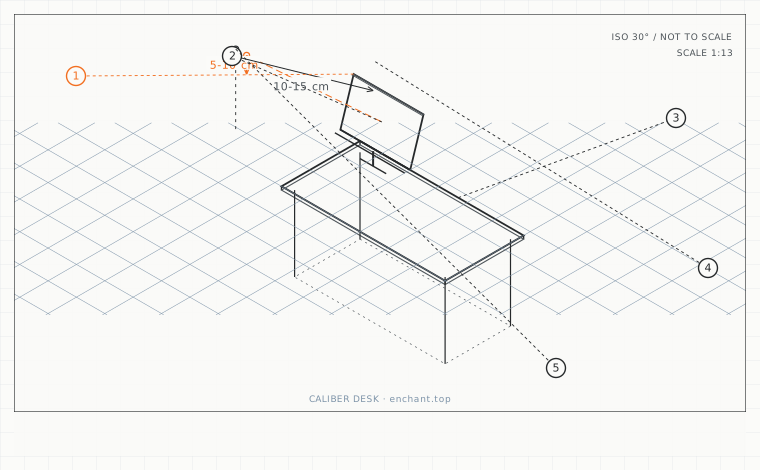
| Callout | Item | Ideal | Band | Why this band |
|---|---|---|---|---|
| 1 | Top of visible screen area below seated eye level (24-27 in) | 5-10 | 0-15 cm | Keeps the whole panel inside the comfortable downward gaze band. |
| 2 | Top of visible screen area below eye level (32 in and up) | 10-15 | 5-20 cm | Larger panels need a lower top edge so the bottom stays reachable by gaze alone. |
| 3 | Downward gaze angle from horizontal | 15-35 | 10-40 deg | The band where the neck extensor muscles carry the least static load. |
| 4 | Laptop screen top shortfall when not raised | 15-35 | 10-45 cm | The amount the neck has to make up, every minute of the day. |
| 5 | Eye-level offset when a screen is stacked above a laptop | 0-10 | -5 to 15 cm | The upper panel takes the primary role; the laptop panel drops to reference duty. |
Measure, then subtract
Measure from the floor to your seated eyes with your gaze level. Then measure from the floor to the top edge of your monitor's visible area. For a 24-27 inch screen at a 60-75 cm viewing distance, the top edge should sit 5-10 cm below eye level. For a 32-inch screen it should be 10-15 cm below.
The reason the number scales with screen size is the bottom of the panel. If you raise a large screen until its top is at eye level, its bottom edge falls below your desk's working height and you start using the lower third for everything, which is where the neck pain comes from.
The neck range you are actually working in
Comfortable sustained gaze sits between 15 and 35 degrees below horizontal. At a 70 cm viewing distance, 20 degrees below horizontal is about 25 cm below eye level, which is the bottom of a 27-inch screen. That gives you the whole panel inside the comfortable band with the top edge 5-10 cm low.
If you have to tilt your head back to see the top of the screen, the panel is too high. If your chin is tucked toward your chest to read the middle of the screen, it is too low. Both are measurable: put a level app on your phone against your cheekbone line.
Laptop users have the hardest version of this problem
A laptop in its natural position has the screen top around 88-98 cm above the floor while seated eye level is 105-130 cm. That is a 15-35 cm shortfall, all of it compensated by neck flexion. There is no adjustment that fixes it - the keyboard and the screen are on the same hinge.
The only real fixes are raising the laptop to the calculated height and adding an external keyboard, or adding a separate monitor and using the laptop screen as a secondary panel. Anything else is a partial measure you will stop doing after a week.
Before you measure
- Measure seated eye level with your gaze level, not on the screen
- Measure the height of the top of the visible screen area
- Set the difference to 5-10 cm for 24-27 inch, 10-15 cm for 32 inch and up
- Put a level app against your cheekbone line and confirm 15-35 degrees down
- If you are on a laptop, raise it and add an external keyboard the same day
Once it is measured
- Top bezel of the visible area 5-10 cm below seated eye level for 24-27 inch screens
- 10-15 cm below eye level for 32-inch and larger screens
- Comfortable sustained gaze is 15-35 degrees below horizontal
- A laptop screen top is typically 15-35 cm too low unless raised
Three budget bands
Under $35 - a stack of rigid boxes or a fixed 12 cm stand plus a monitor riser shelf, measured against a wall mark.
$60-$150 - a gas-spring monitor arm with at least 30 cm of vertical travel, so the height can be re-set for a different chair.
$250+ - a monitor with a built-in height-adjustable stand covering 15 cm of travel and a published pivot point, plus a separate laptop arm.
Printable spec
Screen top 5-10 cm below eye level (24-27 in) - 10-15 cm (32 in+) - gaze 15-35 deg down - laptop needs +15-35 cm of rise
Questions that come up
- My monitor stand has no height adjustment at all. What is the cheapest fix?
- A stack of A4 paper reams or a wooden riser block, measured once against a mark on the wall. It looks improvised but it is a real specification and it costs almost nothing. Replace it with an arm only once you are sure of the height.
- Should I use two monitors at different heights?
- Only if the second one is genuinely secondary. Two panels at different heights make you re-focus and re-angle your neck on every switch. If both get equal use, put them at the same height and set the height for the larger one.
Adjacent factors
- 3.05Viewing distance: arm's length is a myth, here is the actual arithmetic
- 3.05Monitor tilt and glare: stop tilting the screen back to beat reflections
- 3.05Screen size and pixel density: picking the diagonal from your viewing distance
- 3.05Dual-screen angles: the fold, the seam, and the neutral head position
- 3.05Sofa-corner screens: when the top of the screen has to be below your eyes
This page is measurement reference material, not medical advice. It describes dimensions that reduce load on a healthy adult at a desk; it does not diagnose, treat or prevent any condition. If you have an existing back, neck, wrist or circulation problem, or you are pregnant, take the numbers to a clinician or a qualified ergonomist rather than treating them as a prescription. All figures are adult anthropometric approximations - measure your own body before you spend money.