Monitor tilt and glare: stop tilting the screen back to beat reflections
Tilting a monitor back is the reflex fix for a reflection on the screen, and it trades a glare problem for a neck problem. In a small room the tilt is often 10-15 degrees, which lifts your effective gaze target by 8-10 cm and undoes your height setting.
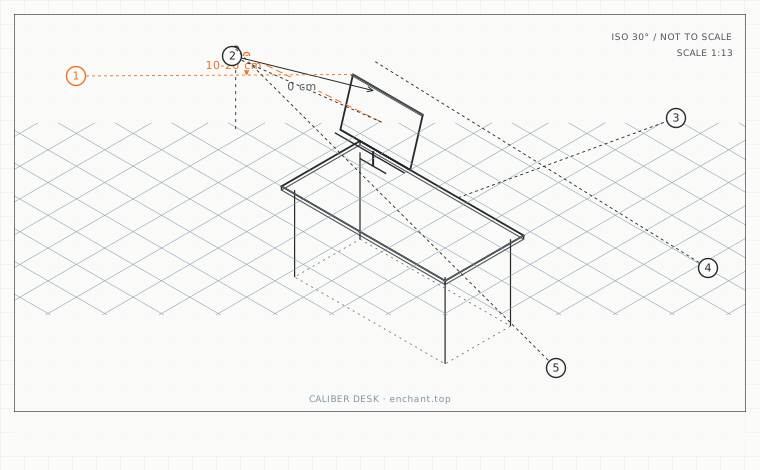
| Callout | Item | Ideal | Band | Why this band |
|---|---|---|---|---|
| 1 | Screen tilt back from vertical (seated, 20 deg down gaze) | 10-20 | 0-25 deg | Keeps the panel roughly perpendicular to the line of sight. |
| 2 | Gaze target shift caused by an extra 10 deg of tilt | 0 | 0-2 cm | The amount by which over-tilting silently breaks your height setting. |
| 3 | Matte film reflection reduction | 60 | 45-75 % | The cheapest way to stop the reflex of tilting the screen back. |
| 4 | Contrast cost of a matte film | 4 | 2-8 % | Small enough to be a good trade against losing your gaze angle. |
| 5 | Maximum upward tilt for a low sofa-corner screen | 10 | 5-15 deg | Beyond this, ceiling lights reflect straight into your eyes. |
The correct tilt is small and backward
Set the panel perpendicular to your line of sight, which for a seated user looking 20 degrees down means tilting the top of the screen back by 10-20 degrees from vertical. That is enough to keep the panel surface at a right angle to your gaze and avoids the off-axis colour shift you get on a tilted panel.
Measure it: place a level app on the top edge of the screen bezel. Ten to twenty degrees back from vertical is the working range. Zero degrees - a perfectly vertical panel - is also fine and is what most arms produce by default.
Fix the glare at the source in a small room
In a small room there is usually exactly one window and one ceiling light, and both reflect off the screen. Move the desk so the window is at your side rather than in front of or behind you. A window directly behind the screen creates a glare source; a window behind you creates a reflection of your own body.
If the layout cannot change - common in a rental - a matte screen film reduces specular reflection by roughly 60 percent at the cost of about 4 percent contrast. That trade is almost always worth it when the alternative is tilting the screen back and losing your gaze angle.
When tilt is legitimate
A tilt is correct when the screen is used by more than one person in a day, or when you deliberately work reclined. In a reclined position your line of sight flattens, so the panel needs to come back toward vertical and the tilt angle reduces rather than increases.
For a low sofa-corner setup the geometry reverses: the screen often ends up below seated eye level and needs to tilt upward, which is exactly the condition that produces the worst reflections from ceiling lights. In that case, tilt the panel up no more than 10 degrees and reposition the lamp rather than the screen.
Before you measure
- Put a level app on the top bezel and read the tilt angle
- Set the top of the screen back 10-20 degrees from vertical
- Move the desk so the window is at your side
- Try moving the lamp before tilting the screen any further
- If glare persists, fit a matte film rather than a steeper tilt
Once it is measured
- Tilt the top of the screen back 10-20 degrees from vertical, measured with a level app
- Put the window at your side, never directly in front of or behind the desk
- A matte film costs about 4 percent contrast and cuts reflection by roughly 60 percent
- In a reclined or sofa position the tilt flattens rather than steepens
Three budget bands
Under $25 - a free level app, plus a repositioned lamp and a matte screen film if needed.
$60-$150 - a monitor arm with a documented tilt range and a friction joint that holds the angle you set.
$300+ - a matte-finish panel with a proper anti-glare coating, which removes the specular reflection without a film at all.
Printable spec
Tilt top back 10-20 deg from vertical - window at your side - matte film cuts reflection 60 percent for 4 percent contrast - max 10 deg up-tilt on a low screen
Questions that come up
- Does a curved monitor change the tilt?
- It reduces the need for tilt. A curved panel presents its outer areas at closer to a right angle to your gaze, so 0-10 degrees is usually enough. Curved panels also cut edge reflections, which is a real benefit in a small room.
- Are anti-glare privacy filters a substitute?
- They solve glare and create a new problem: they cut brightness by 30-50 percent and narrow the viewing angle, which forces you to sit dead centre. Use them on a laptop you work on in public, not on a fixed office screen.
Adjacent factors
- 3.05Monitor height: the top bezel is the number, and it goes below eye level
- 3.05Viewing distance: arm's length is a myth, here is the actual arithmetic
- 3.05Screen size and pixel density: picking the diagonal from your viewing distance
- 3.05Dual-screen angles: the fold, the seam, and the neutral head position
- 3.05Sofa-corner screens: when the top of the screen has to be below your eyes
This page is measurement reference material, not medical advice. It describes dimensions that reduce load on a healthy adult at a desk; it does not diagnose, treat or prevent any condition. If you have an existing back, neck, wrist or circulation problem, or you are pregnant, take the numbers to a clinician or a qualified ergonomist rather than treating them as a prescription. All figures are adult anthropometric approximations - measure your own body before you spend money.