Dual-screen angles: the fold, the seam, and the neutral head position
Two screens set flat in a line look tidy and work badly. The correct dual-screen geometry is a shallow fold around you, with the seam between the panels sitting at your neutral head position, not at the centre of the desk.
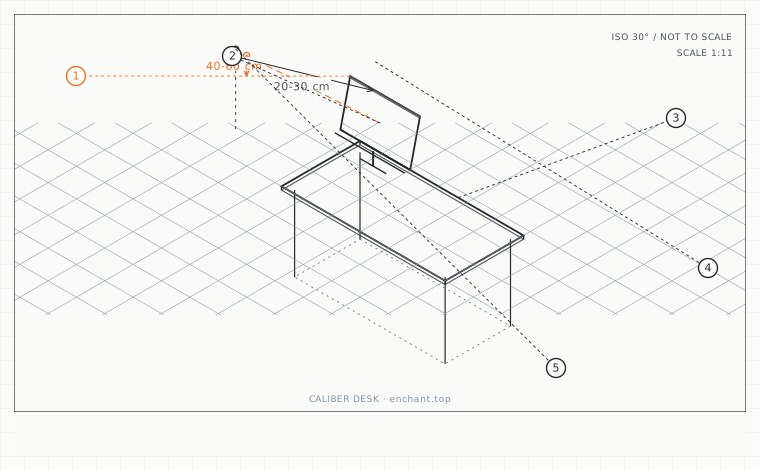
| Callout | Item | Ideal | Band | Why this band |
|---|---|---|---|---|
| 1 | Total fold angle across two panels | 40-60 | 30-70 deg | Brings both panel surfaces close to perpendicular to the line of sight. |
| 2 | Inward angle per panel at 60-70 cm | 20-30 | 15-35 deg | Scales with distance: further away needs less fold. |
| 3 | Seam offset from desk centre (neutral head position) | 2-6 | 0-10 cm | Removes the head rotation that causes one-sided neck tightness. |
| 4 | Extra fold opening when standing | 5-10 | 3-15 deg | Standing increases both eye height and viewing distance. |
| 5 | Eye-level rise from sitting to standing | 25-40 | 20-50 cm | Why a single screen setting cannot serve both positions. |
Find the neutral position first
Close your eyes, look straight ahead, and open them. Your head is now at its neutral position, which for most people is 2-6 cm to one side of the desk centre. Put the seam between the two panels exactly there. This single change removes most of the head rotation from a dual-screen day.
Then set the fold angle. Each panel should be angled inward so its surface is perpendicular to your line of sight. For a 60-70 cm distance and a 27-inch panel, that is 20-30 degrees inward per side, giving a total fold of 40-60 degrees.
Height across a folded pair
Both panels must be at the same height, and the height rule from chapter 3 applies to whichever panel is larger. If they differ in size, align the top edges rather than the bottom - bottom alignment puts the larger panel's top edge above your comfortable gaze and leaves the smaller one entirely below it.
A fold changes the effective distance to the top of each panel: the inner top corners are the closest points to your eyes. If you notice your gaze drifting to the inner-bottom of each screen, the panels are folded too tightly and the outer halves are too far.
Sit-stand desks add a second geometry
When you stand, your eye level rises by 25-40 cm and your viewing distance increases because your torso is further from the desk. A dual-screen fold that was correct sitting is too tight standing, and the panels need to open by roughly 5-10 degrees each.
The practical fix is an arm per panel rather than a single dual arm, so each can be re-angled independently when you change position. If you use a single dual arm, choose one with independent tilt and pan on each side and mark the two settings on the joints with tape.
Before you measure
- Close your eyes, look ahead, and open them to find your neutral head position
- Place the seam between the panels at that position
- Fold each panel 20-30 degrees inward at a 60-70 cm distance
- Align the top edges if the panels are different sizes
- Stand up and re-check: open each panel by 5-10 degrees if needed
Once it is measured
- Put the seam at your neutral head position, not the desk centre
- Fold each panel 20-30 degrees inward (40-60 degrees total) at 60-70 cm
- Align top edges, not bottom edges, when panel sizes differ
- Standing requires the fold to open by about 5-10 degrees per side
Three budget bands
Under $45 - two single arms rather than one dual arm, so each panel can be re-angled independently.
$200-$400 - a dual arm with independent tilt, pan and height per side, plus a marked scale on the joints.
$700+ - a 49-inch 32:9 panel at 1000R curvature, which supplies the correct fold angle without any per-panel adjustment.
Printable spec
Seam at your neutral head position - fold each panel 20-30 deg inward (total 40-60) - align top edges - open each side 5-10 deg when standing
Questions that come up
- Is a dual monitor arm or two single arms better?
- Two singles, unless your desk is depth-constrained. Singles allow independent angle and height, which is what you need for a sit-stand setup. A dual arm saves 6-10 cm of desk depth at the cost of that independence.
- Can I put one monitor vertically next to a horizontal one?
- Yes, and it is a good layout for code or long documents. Put the vertical panel as the primary if that is where the work is, and remember that a rotated 27-inch panel puts its top edge around 55 cm above the desk - well above your comfortable gaze band.
Adjacent factors
- 3.05Monitor height: the top bezel is the number, and it goes below eye level
- 3.05Viewing distance: arm's length is a myth, here is the actual arithmetic
- 3.05Monitor tilt and glare: stop tilting the screen back to beat reflections
- 3.05Screen size and pixel density: picking the diagonal from your viewing distance
- 3.05Sofa-corner screens: when the top of the screen has to be below your eyes
This page is measurement reference material, not medical advice. It describes dimensions that reduce load on a healthy adult at a desk; it does not diagnose, treat or prevent any condition. If you have an existing back, neck, wrist or circulation problem, or you are pregnant, take the numbers to a clinician or a qualified ergonomist rather than treating them as a prescription. All figures are adult anthropometric approximations - measure your own body before you spend money.