Screen size and pixel density: picking the diagonal from your viewing distance
Screen size discussions usually start with the panel and work backwards. Do it the other way: fix the distance your desk and eyes allow, then choose the diagonal that fills a comfortable angle of view. That order produces a screen you can actually use.
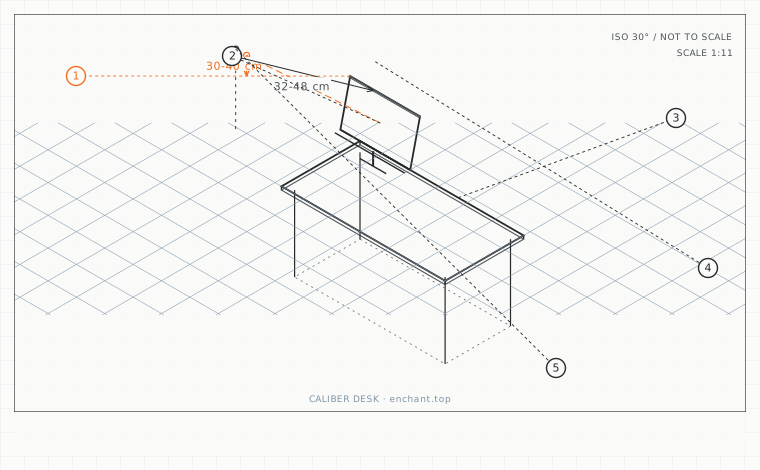
| Callout | Item | Ideal | Band | Why this band |
|---|---|---|---|---|
| 1 | Horizontal field filled by the primary screen | 30-40 | 25-45 deg | Wider and you move your head; narrower and you are wasting the panel. |
| 2 | Screen width for a 60 cm viewing distance | 32-48 | 28-55 cm | A 24-27 inch 16:9 panel; the most common correct answer. |
| 3 | Screen width for a 75 cm viewing distance | 40-60 | 36-70 cm | A 27-32 inch panel; the upper end of what most desks allow. |
| 4 | Pixel density for general desktop work | 90-110 | 85-140 ppi | Clean text without needing operating-system scaling. |
| 5 | Portable panel weight for travel | 700-900 | 500-1200 g | Above this you will leave it in the hotel room, which defeats the purpose. |
The 40-degree field
The primary screen should occupy roughly 30-40 degrees of your horizontal field of view. At 60 cm that is a screen 32-48 cm wide, which is a 24-27 inch 16:9 panel. At 75 cm it is 40-60 cm wide, which is a 27-32 inch panel. At 100 cm - a mobile or hotel setup where you sit further back - it is a 34-40 inch panel.
Measure your actual distance first with the string test from the previous spec sheet. Buying a screen and then discovering the correct distance is 20 cm shorter than it wants is the most expensive ordering mistake in desk building.
Pixel density, and when you can stop caring
Divide the horizontal resolution by the width in inches to get pixels per inch. Below 90 ppi you will see individual pixels at normal distance. Between 90 and 110 ppi is the practical sweet spot for desktop work because operating systems still scale text cleanly. Above 140 ppi you need scaling, and mixed-resolution multi-monitor setups become painful.
The exception is text-heavy work: 110-140 ppi genuinely reduces the effort of reading small type. If your work is code, spreadsheets or documents, buy density. If it is mostly one large application, 90-100 ppi is fine and cheaper.
Mobile and hotel screens
On the road you cannot control the distance, so control the size. A 16-inch portable panel at 55 cm gives you roughly the same angular field as a 27-inch at 95 cm, and it fits in a laptop bag. Check the weight before you commit - a 16-inch portable panel is typically 700-900 g.
For a hotel room the constraint is the desk, which is usually 45-50 cm deep and 60 cm wide. A 16-inch panel plus a laptop on a stand will not fit side by side at a usable angle. Choose one: either the laptop raised with an external keyboard and no second screen, or a second screen with the laptop as the primary.
Before you measure
- Measure your actual viewing distance with the string test first
- Compute the screen width that fills 30-40 degrees at that distance
- Convert to a diagonal for a 16:9 panel
- Check the pixel density is between 90 and 140 ppi
- For travel, weigh the portable panel before buying
Once it is measured
- Primary screen should fill 30-40 degrees of horizontal view
- 60 cm distance suits a 24-27 inch panel; 75 cm suits 27-32 inch
- 90-110 ppi is the practical sweet spot; 110-140 ppi helps text-heavy work
- In a hotel, a 16-inch portable panel gives the same angular field as a 27-inch at 95 cm
Three budget bands
Under $150 - a 24-inch 1080p panel at 92 ppi. Correct at 50-60 cm and cheap enough to replace later.
$280-$450 - a 27-inch 1440p panel at 109 ppi with a height-adjustable stand. The best all-round answer for a 70 cm desk.
$700-$1100 - a 32-inch 4K at 138 ppi, run at 125 percent scaling, giving text crispness and enough width for two documents side by side.
Printable spec
Fill 30-40 deg of view - 60 cm -> 32-48 cm wide (24-27 in) - 75 cm -> 40-60 cm wide (27-32 in) - 90-110 ppi sweet spot - travel panel under 900 g
Questions that come up
- Is a bigger screen always better?
- Only up to the point where it fits your viewing distance. A 32-inch panel at 55 cm fills 55 degrees of view, which means constant head movement between the corners. If you cannot sit further back, a smaller panel is the better screen.
- Do I need matching resolutions across two screens?
- It helps a great deal. Different densities make the same window size render at different physical sizes as you drag between them, and text that is comfortable on one is blurry or tiny on the other. Match density, not just diagonal.
Adjacent factors
- 3.05Monitor height: the top bezel is the number, and it goes below eye level
- 3.05Viewing distance: arm's length is a myth, here is the actual arithmetic
- 3.05Monitor tilt and glare: stop tilting the screen back to beat reflections
- 3.05Dual-screen angles: the fold, the seam, and the neutral head position
- 3.05Sofa-corner screens: when the top of the screen has to be below your eyes
This page is measurement reference material, not medical advice. It describes dimensions that reduce load on a healthy adult at a desk; it does not diagnose, treat or prevent any condition. If you have an existing back, neck, wrist or circulation problem, or you are pregnant, take the numbers to a clinician or a qualified ergonomist rather than treating them as a prescription. All figures are adult anthropometric approximations - measure your own body before you spend money.