The primary reach zone: two arcs that decide what belongs on the desk
Every object on a desk has a cost: the reach to get it. Two arcs drawn from your shoulder joint sort the whole desk into three zones and tell you, objectively, where each item goes and which items should not be there at all.
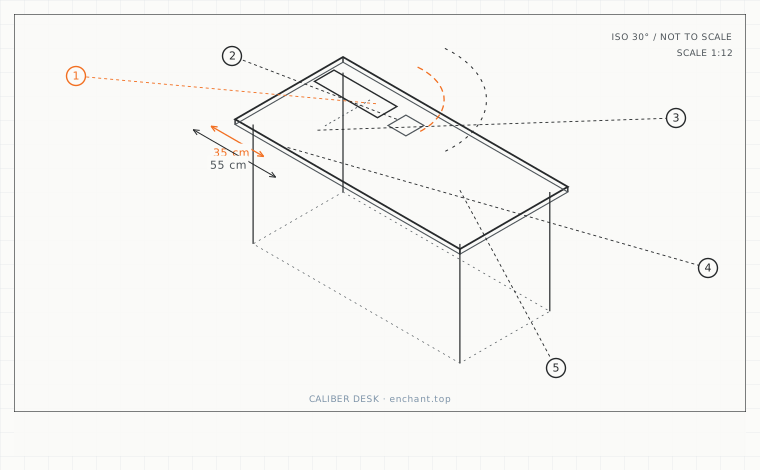
| Callout | Item | Ideal | Band | Why this band |
|---|---|---|---|---|
| 1 | Constant-use arc radius from the shoulder joint | 35 | 30-40 cm | Inside this arc the arm stays supported and the elbow does the work. |
| 2 | Frequent-use arc radius | 55 | 50-60 cm | Reached by extending the elbow, still without rotating the scapula. |
| 3 | Maximum lateral offset for a constant-use item | 15 | 10-20 cm | Sideways reach rotates the scapula; forward reach does not. |
| 4 | Shoulder joint marker placement | 4 | 2-6 cm | Below the top of the shoulder; measuring from the wrong point skews every arc. |
| 5 | Touch frequency threshold for constant use | 10/hr | 5-20 x | The rule that decides whether an item earns desk space. |
Draw the two arcs
Sit in your working position and put a marker at your shoulder joint - roughly 4 cm below the top of the shoulder, on the outer side. Now draw an arc on the desk at 35 cm from that point: this is the constant-use zone. Draw a second at 55 cm: this is the frequent-use zone. Beyond 55 cm is occasional use.
The arcs are measured from the shoulder, not from the front edge of the desk, and that difference matters. On a dual-screen desk you sit further back, which moves every arc back with you and pushes items outside the zones that looked fine on paper.
Assign every object
Constant use at 35 cm: keyboard, mouse, and the phone if you take calls all day. Frequent use at 55 cm: a document holder, a notepad, a second keyboard if you use one. Occasional: everything else, and 'everything else' should not be on the desk at all.
The hard rule is that nothing you touch more than ten times an hour may sit outside the 35 cm arc. In a dual-screen setup that rule usually demotes the second screen to occasional use, which is correct - and it means the second screen belongs on an arm at the edge of the 55 cm arc, not in the middle of the desk.
The sideways reach is worse than the forward reach
Reaching forward uses your elbow and shoulder in a direction they handle well. Reaching sideways rotates the scapula and pulls the shoulder into internal rotation. A mouse 30 cm to the side is worse than a mouse 30 cm forward, even though the distance is the same.
Measure the lateral offset from the midpoint between your shoulders to the object. Keep it under 20 cm for constant-use items, and under 15 cm if the item is used continuously. This is the number that decides whether you can keep a numeric keypad on the right of your keyboard, or whether it has to go.
Before you measure
- Mark your shoulder joint 4 cm below the top of the shoulder
- Draw a 35 cm arc and a 55 cm arc on the desk surface
- Put the keyboard, mouse and phone inside 35 cm
- Move anything touched under ten times an hour outside 55 cm
- Measure the lateral offset of the mouse and keep it under 20 cm
Once it is measured
- Measure arcs from the shoulder joint, not the desk edge
- Constant-use zone 35 cm, frequent-use 55 cm, everything else is storage
- Nothing touched more than ten times an hour belongs outside 35 cm
- Keep lateral offset under 20 cm - sideways reach is worse than forward reach
Three budget bands
Under $15 - a roll of masking tape and a tape measure. Marking the arcs once changes where everything lives permanently.
$120-$300 - a keyboard tray under 70 cm wide that keeps the whole input set inside the 35 cm arc.
$350+ - a split keyboard with the two halves shoulder-width apart, which brings both hands inside a 30 cm arc from their own shoulder.
Printable spec
Constant use 35 cm from the shoulder - frequent use 55 cm - lateral offset under 20 cm - nothing touched 10+ times an hour outside the 35 cm arc
Questions that come up
- Where should a second monitor go if it is only used occasionally?
- At the edge of the 55 cm arc, on the side that matches your hand dominance for the work it holds - reference material on the left for a right-handed person, since the right hand stays on the mouse. Do not put it dead centre.
- Does the arc change when I stand?
- Yes, and more than you would expect. Standing pushes the shoulder joint roughly 15-25 cm further from the desk edge, which means items that were inside the arc sitting down can fall outside it standing. Re-mark the arcs at your standing height.
Adjacent factors
- 4.05Elbow angle: why 90 degrees is the floor, not the target
- 4.05Wrist rest and neutral wrist: measuring the angle you actually type at
This page is measurement reference material, not medical advice. It describes dimensions that reduce load on a healthy adult at a desk; it does not diagnose, treat or prevent any condition. If you have an existing back, neck, wrist or circulation problem, or you are pregnant, take the numbers to a clinician or a qualified ergonomist rather than treating them as a prescription. All figures are adult anthropometric approximations - measure your own body before you spend money.